

Instructions for Emergency Contacts in Smartphones
For iPhone Users
- Access Emergency SOS Settings
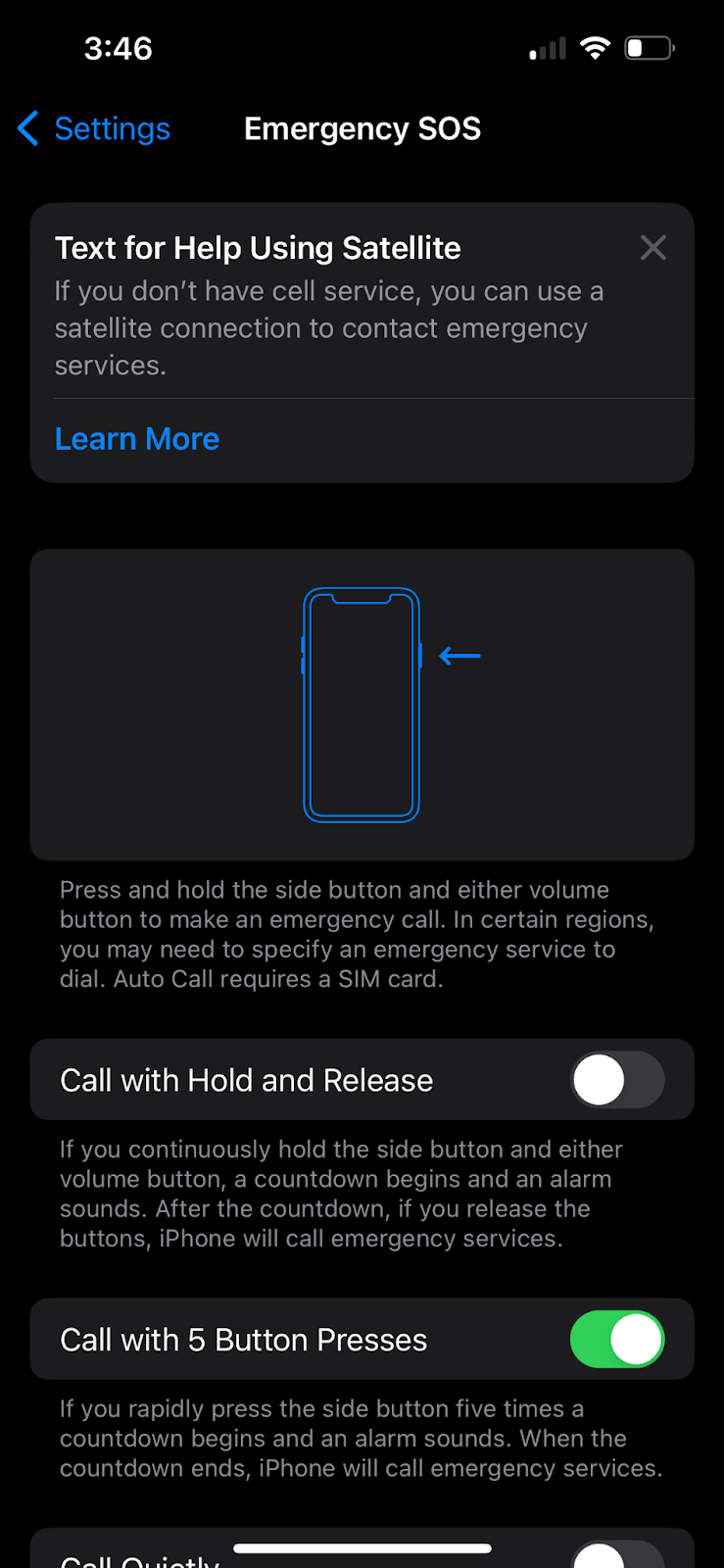
Open the Settings app on your iPhone and Tap on Emergency SOS.
- Configure Activation Method:
- Call with Hold:
- Turn on/off: Toggle the “Call with Hold” option to enable or disable the side button and volume button hold method for activating Emergency SOS.
- How it works: Press and hold the side button and either volume button to start a countdown to call emergency services.
- Call with 5 Presses:
- Turn on/off: Toggle the “Call with 5 Presses” option to enable or disable the rapid side button press method for activating Emergency SOS.
- How it works: Rapidly press the side button five times to start a countdown to call emergency services.
- Manage Emergency Contacts:
- Go to Health:
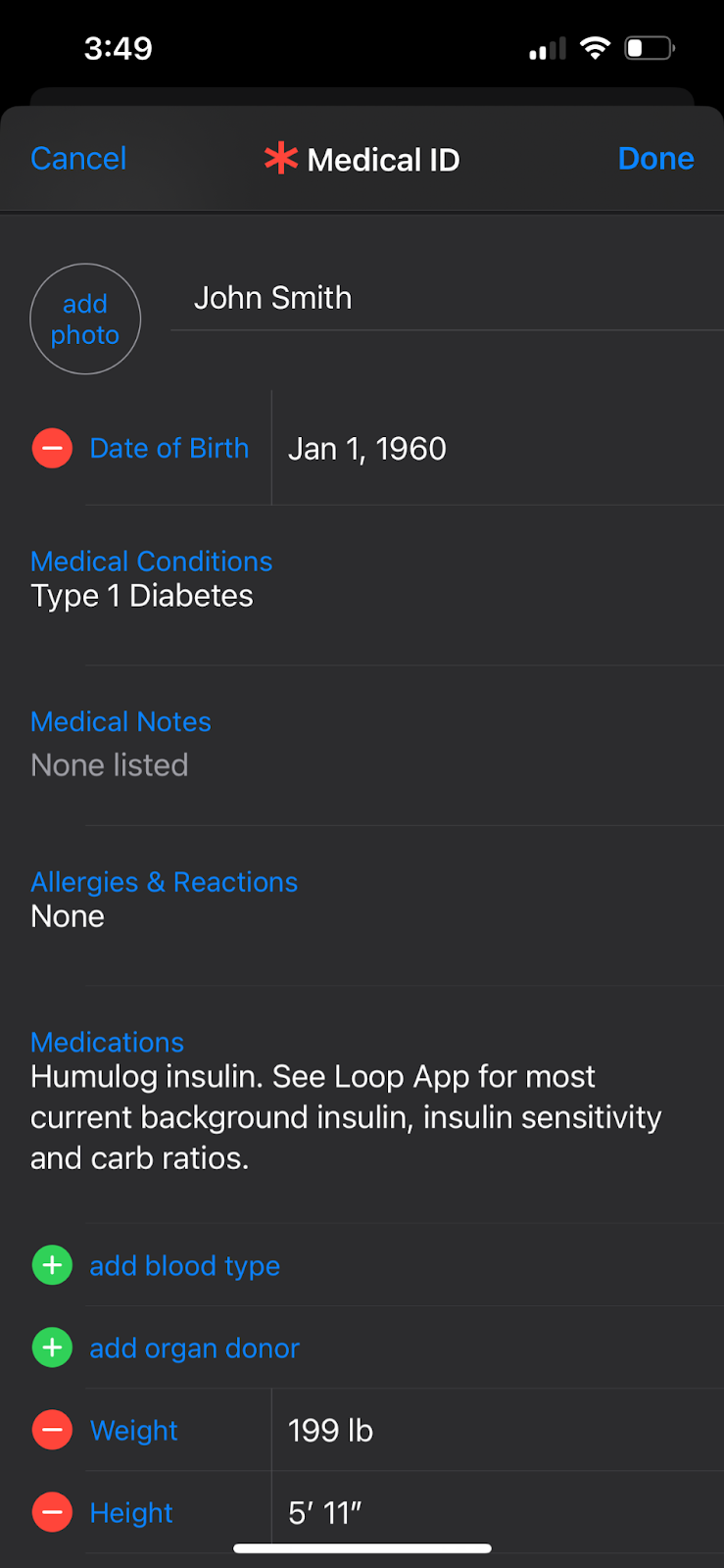
Open the Health app. - Tap Medical ID:
Tap on your profile picture in the top right corner, then tap “Medical ID”. - Edit Emergency Contacts:
Tap “Edit” in the top right corner to add, remove, or edit emergency contacts. - Add Emergency Contacts:
Tap the “+” button to add a new emergency contact and specify their relationship to you.
- Emergency SOS via Satellite (For iPhone 14 and later):
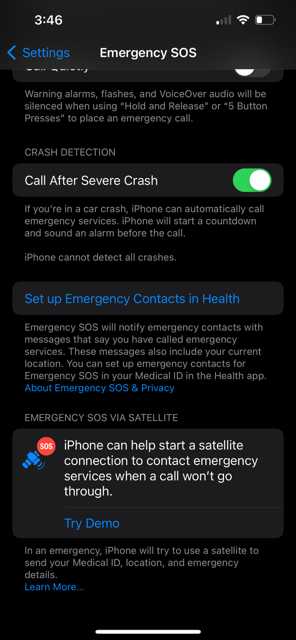
- Access Satellite Settings: Go to Settings > Emergency SOS.
- Connect to Satellite: If you’re in an area with no cellular or Wi-Fi coverage, you can use Emergency SOS via satellite to text emergency services.
- Emergency Text via Satellite: If the call doesn’t go through, tap “Emergency Text via Satellite” to text emergency services.
- Report Emergency: Tap “Report Emergency” and follow the on-screen instructions.
Recent Stories
Medicare, Medigap, and the Cost of Aging with Type 1: What’s Changing in 2026
This article is about what’s actually happening with Medigap premiums in 2026, what’s changing in Medicare’s diabetes coverage (some of it genuinely good), and the financial assistance programs that thousands of older adults with T1D qualify for but never use because no one tells them about them.
Interview: Brian and His Son Owen Share Many Things Including Type 1 Diabetes
Brian got type 1 diabetes when he was seven. He long feared one of his three children might face the same fate––until one did. His son Owen got T1D just past his eighth birthday. Brian is a clinical exercise physiologist and diabetes educator by training, cares for his three children, lives with type 1 and Owen’s type 1, and has helped start a branch of a grass roots diabetes meet up in his hometown of Philadelphia, GrownUp T1Ds. What’s it like with all that on your plate? Brian says he takes it one day at a time, with lots of coffee.
We are TRENDING! Why Fashion Suddenly Loves Older Women
These days, as Ms. Wintour wrote in the magazine, “I feel age is actually an advantage.” Or so it is beginning to seem in fashion. According to data from the fashion search engine Tagwalk, 5 percent of the top 20 brands included at least one curve, or plus-size, model in their runway shows, but 100 percent included an older model.